<?xml version="1.0" encoding="utf-8"?><feed xmlns="http://www.w3.org/2005/Atom" ><generator uri="https://jekyllrb.com/" version="3.9.5">Jekyll</generator><link href="https://damian-romero.github.io//feed.xml" rel="self" type="application/atom+xml" /><link href="https://damian-romero.github.io//" rel="alternate" type="text/html" /><updated>2024-06-20T03:53:53+00:00</updated><id>https://damian-romero.github.io//feed.xml</id><title type="html">Damian Romero,
Computational Hispanic Linguist</title><subtitle>Damian Romero's professional website.</subtitle><author><name>Damian Romero</name></author><entry><title type="html">Spanish-Speaking Video Game Gems for Learning Spanish, Part 1</title><link href="https://damian-romero.github.io//blog/spanish-speaking-video-game-gems-for-learning-spanish-part-1/" rel="alternate" type="text/html" title="Spanish-Speaking Video Game Gems for Learning Spanish, Part 1" /><published>2024-06-19T00:00:00+00:00</published><updated>2024-06-19T00:00:00+00:00</updated><id>https://damian-romero.github.io//blog/spanish-speaking-video-game-gems-for-learning-spanish-part-1</id><content type="html" xml:base="https://damian-romero.github.io//blog/spanish-speaking-video-game-gems-for-learning-spanish-part-1/"><![CDATA[<h2 id="introduction">Introduction</h2>

<p>In recent years, I’ve noticed a growing trend among students learning Spanish who also have a passion for video games. This got me thinking about how video games can be a natural and enjoyable way to develop reading and listening comprehension skills in a new language. Of course, this is hardly an original thought: there is an entire field of academic research that focuses on language learning through video games. If you don’t believe me, just think of the research there is behind Duolingo, for example.  However, many millennials (including myself) and even some boomers learned languages through gaming long before game translations became widely available.</p>

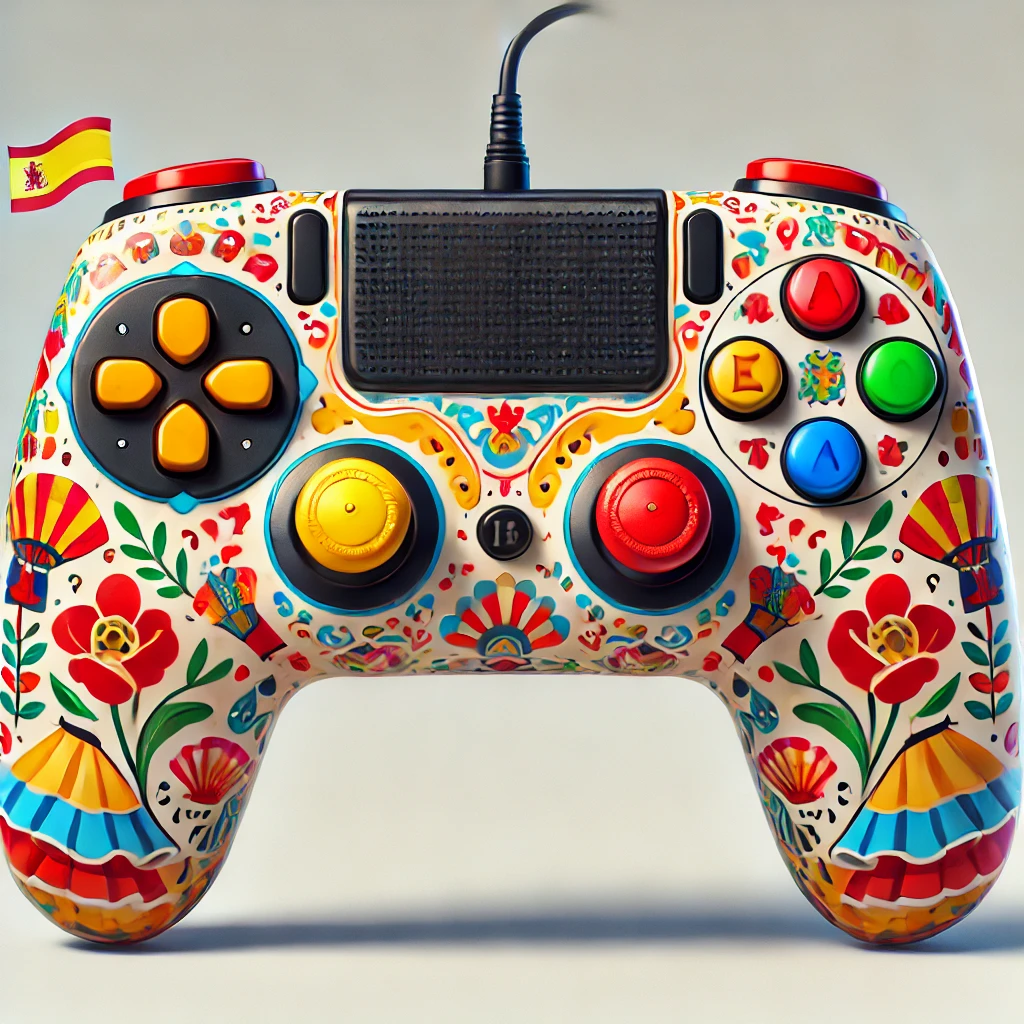
<p>So because many gamers would like to learn Spanish, and many Spanish learners like gaming, I thought I would start exploring and reviewing some popular video games produced in Spanish-speaking countries. The idea here is to tell you about some of the most recently popular video games that have been created by companies from Spanish-speaking countries so that you can try them out yourself. Just don’t forget to go to settings and change your language to Spanish!</p>

<p>In the list I have compiled, I talk about each game’s unique features for learning Spanish. On a series of follow-up blogs you can expect me to go over some of these games, one by one, exploring their overall usefulness for learning Spanish and share these insights with you.</p>

<p><em>Disclaimer</em>: I only focused on games that were are available through <a href="https://store.steampowered.com/">Steam</a>. You might be able to get some of them for your console, but I wouldn’t know.</p>

<h2 id="discovering-spanish-speaking-video-games">Discovering Spanish-Speaking Video Games</h2>

<p><img src="/assets/videogames-spanish/spain-controller.webp" alt="Controller with a Spanish Motif" /></p>

<h3 id="blasphemous-the-game-kitchen-spain">Blasphemous (The Game Kitchen, Spain)</h3>

<p><strong>Cool Features for Learning Spanish:</strong></p>
<ul>
  <li><strong>Rich Lore and Dialogues:</strong> This game is filled with detailed descriptions, dialogues, and lore steeped in Spanish culture and language. Playing the game in Spanish allows learners to practice reading and listening skills.</li>
  <li><strong>Low Language Dependency for Mechanics:</strong> The game mechanics are intuitive and do not rely heavily on language comprehension, allowing players to enjoy the game while passively absorbing Spanish vocabulary.</li>
  <li><strong>Available on:</strong> Windows, macOS, and SteamOS (+ Linux)</li>
</ul>

<h3 id="gris-nomada-studio-spain">GRIS (Nomada Studio, Spain)</h3>

<p><strong>Cool Features for Learning Spanish:</strong></p>
<ul>
  <li><strong>Minimal Text, Maximum Emotion:</strong> GRIS uses minimal text but powerful visual storytelling. The sparse text is in Spanish, making it easy for learners to understand.</li>
  <li><strong>Visual Context Clues:</strong> Beautiful artwork and visual cues help players grasp the story without needing extensive language skills, perfect for beginners.</li>
  <li><strong>Available on:</strong> Windows, and macOS</li>
</ul>

<h3 id="moonlighter-digital-sun-spain">Moonlighter (Digital Sun, Spain)</h3>

<p><strong>Cool Features for Learning Spanish:</strong></p>
<ul>
  <li><strong>Merchant and Adventure Dialogues:</strong> The game combines shop management with dungeon crawling. Interacting with customers and villagers provides a practical context for learning everyday vocabulary.</li>
  <li><strong>Inventory and Management Terms:</strong> Managing the shop inventory introduces players to specific terms related to commerce and trade in Spanish.</li>
  <li><strong>Available on:</strong> Windows, macOS, and SteamOS (+ Linux)</li>
</ul>

<h3 id="rime-tequila-works-spain">Rime (Tequila Works, Spain)</h3>

<p><strong>Cool Features for Learning Spanish:</strong></p>
<ul>
  <li><strong>Environmental Storytelling:</strong> Rime tells its story through the environment, puzzles, and minimal dialogue. The few texts and spoken lines in Spanish help players pick up new vocabulary without overwhelming them.</li>
  <li><strong>Subtitles and Audio Options:</strong> Players can choose to have Spanish subtitles and audio, aiding in listening and reading comprehension.</li>
  <li><strong>Available on:</strong> Windows only</li>
</ul>

<h3 id="endless-space-2-amplitude-studios-spain">Endless Space 2 (Amplitude Studios, Spain)</h3>

<p><strong>Cool Features for Learning Spanish:</strong></p>
<ul>
  <li><strong>Complex Strategy and Vocabulary:</strong> This strategy game involves managing a space empire, which requires understanding complex terms related to science, technology, and governance in Spanish.</li>
  <li><strong>In-Depth Lore:</strong> The game’s extensive lore and narrative elements are perfect for advanced learners looking to expand their vocabulary in specialized topics.</li>
  <li><strong>Available on:</strong> Windows and macOS</li>
</ul>

<h3 id="the-red-strings-club-deconstructeam-spain">The Red Strings Club (Deconstructeam, Spain)</h3>

<p><strong>Cool Features for Learning Spanish:</strong></p>
<ul>
  <li><strong>Dialogues and Ethical Choices:</strong> This narrative-driven game revolves around conversations and ethical dilemmas. Playing in Spanish offers immersive practice in conversational language and moral vocabulary. Perhaps for more advances Spanish learners.</li>
  <li><strong>Cyberpunk Setting:</strong> The futuristic setting introduces unique vocabulary related to technology and cybernetics.</li>
  <li><strong>Available on:</strong> Windows, macOS, and SteamOS (+ Linux)</li>
</ul>

<h3 id="they-are-billions-numantian-games-spain">They Are Billions (Numantian Games, Spain)</h3>

<p><strong>Cool Features for Learning Spanish:</strong></p>
<ul>
  <li><strong>Real-Time Strategy and Survival:</strong> Managing resources and defending colonies introduces players to practical vocabulary related to strategy and survival.</li>
  <li><strong>Minimal Dependency on Language for Gameplay:</strong> The core mechanics are intuitive, allowing players to focus on learning Spanish through the game’s narrative and interface.</li>
  <li><strong>Available on:</strong> Windows only</li>
</ul>

<h2 id="exploring-more-games-beyond-europe">Exploring More Games Beyond Europe</h2>

<p><img src="/assets/videogames-spanish/latin-american-controller.webp" alt="Controller with Latin-American Motifs" /></p>

<p>Because there is more to the Spanish-speaking world than just Spain, I looked for games from Spanish-speaking countries outside of Europe as well. Here are some gems I found:</p>

<h3 id="mulaka-lienzo-mexico">Mulaka (Lienzo, Mexico)</h3>

<p><strong>Cool Features for Learning Spanish:</strong></p>
<ul>
  <li><strong>Indigenous Culture and Mythology:</strong> Mulaka is based on the rich mythology of the Tarahumara people of northern Mexico. Playing in Spanish exposes learners to unique cultural vocabulary and traditional stories.</li>
  <li><strong>Environmental Exploration:</strong> The game involves exploring various landscapes and solving puzzles, providing context for learning descriptive language.</li>
  <li><strong>Available on:</strong> Windows and macOS</li>
</ul>

<h3 id="guacamelee-series-drinkbox-studios-canada-with-mexican-cultural-themes">Guacamelee! Series (DrinkBox Studios, Canada, with Mexican cultural themes)</h3>

<p><strong>Cool Features for Learning Spanish:</strong></p>
<ul>
  <li><strong>Mexican Folklore and Humor:</strong> Okay, this isn’t really a game from a Spanish-speaking country, but I love it! The game is filled with references to Mexican culture, folklore, and humor. Spanish is used throughout the game, enhancing cultural immersion.</li>
  <li><strong>Action and Platforming:</strong> The action-oriented gameplay and clear objectives allow players to enjoy the game while picking up Spanish phrases and vocabulary.</li>
  <li><strong>Available on:</strong> Windows only</li>
</ul>

<h3 id="okhlos-coffee-powered-machine-argentina">Okhlos (Coffee Powered Machine, Argentina)</h3>

<p><strong>Cool Features for Learning Spanish:</strong></p>
<ul>
  <li><strong>Mythological References:</strong> Okhlos is based on Greek mythology but developed by an Argentinian studio, offering a mix of Spanish language and mythological terms.</li>
  <li><strong>Humorous and Satirical Tone:</strong> The game’s humorous and satirical approach makes learning Spanish enjoyable and engaging.</li>
  <li><strong>Available on:</strong> Windows, macOS, and SteamOS (+ Linux)</li>
</ul>

<h3 id="quantum-league-nimble-giant-entertainment-argentina">Quantum League (Nimble Giant Entertainment, Argentina)</h3>

<p><strong>Cool Features for Learning Spanish:</strong></p>
<ul>
  <li><strong>Innovative Gameplay Mechanics:</strong> Quantum League features unique time-loop mechanics. The game’s interface and tutorials in Spanish help players learn specific gaming and technological vocabulary.</li>
  <li><strong>Multiplayer Communication:</strong> Playing in multiplayer mode with Spanish-speaking players encourages practical language use in real-time scenarios.</li>
  <li><strong>Available on:</strong> Windows, macOS, and SteamOS (+ Linux)</li>
</ul>

<h3 id="shadow-brawlers-team-guazú-argentina">Shadow Brawlers (Team Guazú, Argentina)</h3>

<p><strong>Cool Features for Learning Spanish:</strong></p>
<ul>
  <li><strong>Fast-Paced Brawling:</strong> The game’s quick and intense brawling mechanics are easy to follow, allowing players to focus on the Spanish text and instructions.</li>
  <li><strong>Minimalistic Art Style:</strong> The clear and simple art style helps players concentrate on the language elements without visual overload.</li>
  <li><strong>Available on:</strong> Windows only</li>
</ul>

<h3 id="nubarron-the-adventure-of-an-unlucky-gnome-nastycloud-argentina">Nubarron: The Adventure of an Unlucky Gnome (Nastycloud, Argentina)</h3>

<p><strong>Cool Features for Learning Spanish:</strong></p>
<ul>
  <li><strong>Narrative-Driven Gameplay:</strong> The game’s storyline and character interactions are rich in dialogue, offering ample opportunity to practice reading and listening skills.</li>
  <li><strong>Fantasy Setting:</strong> The whimsical fantasy setting introduces unique vocabulary related to magic and adventure.</li>
  <li><strong>Available on:</strong> Windows, macOS, and SteamOS (+ Linux)</li>
</ul>

<h2 id="looking-ahead">Looking Ahead</h2>

<p>I’m excited to dive deeper into these games and write more in-depth reviews on how each can be used for learning Spanish. Each game offers unique opportunities for language practice through its dialogue, narrative, or gameplay mechanics. If you’re learning Spanish, or if you’d like to get started, you can immerse yourself in diverse genres and settings and start a a natural and enjoyable learning experience while playing.</p>

<p>Stay tuned for detailed reviews on some of these titles and discover how you can enhance your Spanish learning journey through the power of video games. Happy gaming!</p>

<p><img src="/assets/images/looking-ahead.png" alt="Looking Ahead Image" /></p>]]></content><author><name>Damian Romero</name></author><category term="blog" /><category term="Learning" /><category term="Spanish" /><category term="Reviews" /><category term="Gaming" /><summary type="html"><![CDATA[Dive into the world of video games from Spanish-speaking countries and discover how they can enhance your Spanish learning journey.]]></summary></entry><entry><title type="html">Taoist Gameplay Part 1: How To</title><link href="https://damian-romero.github.io//blog/taoist-gameplay-part-1/" rel="alternate" type="text/html" title="Taoist Gameplay Part 1: How To" /><published>2024-06-11T00:00:00+00:00</published><updated>2024-06-11T00:00:00+00:00</updated><id>https://damian-romero.github.io//blog/taoist-gameplay-part-1</id><content type="html" xml:base="https://damian-romero.github.io//blog/taoist-gameplay-part-1/"><![CDATA[<h2 id="introduction">Introduction</h2>

<p>Lately, I’ve been pondering how to create a more balanced experience in my much too urban, modern, busy life. While I make conscious efforts to juggle work, family, fun, and rest, I often get overwhelmed by trying to do everything, putting me close to burnout. However, I refuse to believe that this is the only way to live. While I know there are several commercial options ranging from apps to productivity books (many of which I’ve tried and read), I’ve come to believe it is important for everyone to find their own solutions with their own resources; their own way that hits closer to home.</p>

<p>It was during this search that I was led back to one of my earliest Taoist readings, <a href="https://en.wikipedia.org/wiki/The_Tao_of_Pooh"><em>The Tao of Pooh</em></a> by Benjamin Hoff. The book is an excellent introduction to Taoist philosophy, showing in simple and concrete ways how we can all live more fulfilling lives by becoming part of the flow of things instead of going against it.</p>

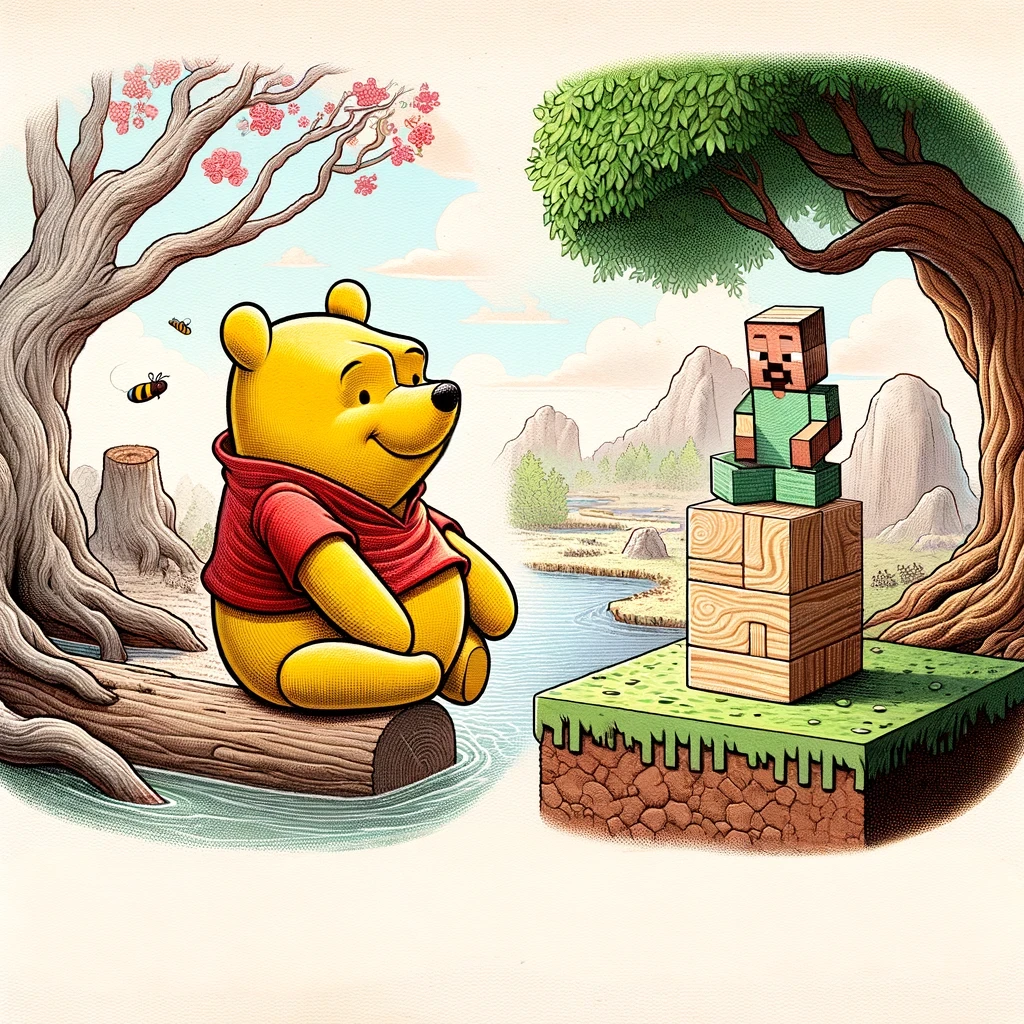
<p>The first, and I think main, Taoist principle that the book talks about is <strong><em>Pu</em></strong>, or as Benjamin Hoff calls it, “The Uncarved Block,” which is a metaphor for <em>life as it is in its natural state</em>. He makes the connection between “Pooh” and “Pu” and how the unpretentious, unambitious stuffed bear can go with the flow of life as it presents itself. For me, “uncarved block” had a different implication. It literally meant the untouched wood blocks from the trees that naturally spawn in Minecraft when you start a new game or discover new areas.</p>

<p><img src="/assets/images/taoist-gameplay/pooh.webp" alt="Pooh" /></p>

<p>It was then that I decided to use Minecraft as a medium to live through Taoist principles. I believe this approach can offer a creative and immersive way to practice the Taoist ethos without the pressures and distractions of modern society and IRL circumstances.</p>

<p>Let’s dive into this idea and see how Minecraft players can shape it into something practical and meaningful.</p>

<h2 id="taoist-gameplay">Taoist gameplay</h2>

<p>Taoism (or more commonly, “Daoism”) encompasses a broad cultural, intellectual, religious, and textual tradition that originated in China around 500 BCE and continues to the present day (Moeller, 2012, p. 298).</p>

<p>The idea of living a Taoist life is based on being one with nature and going with the flow of life. It emphasizes the harmony between opposites (light and dark, feminine and masculine, etc.), simplicity, humility, compassion, and frugality.</p>

<p>Taoist gameplay is a way to experience and practice Taoist principles inside a game (any game). By adopting a Taoist approach in Minecraft, you can create a virtual experience that mirrors the peaceful and balanced existence that Taoism advocates. This unique playstyle allows players to explore and integrate these spiritual principles in a way that can be both fulfilling and enlightening.</p>

<h2 id="taoism-irl">Taoism irl</h2>

<p><img src="/assets/images/taoist-gameplay/taoism-irl.webp" alt="Taoism IRL" /></p>

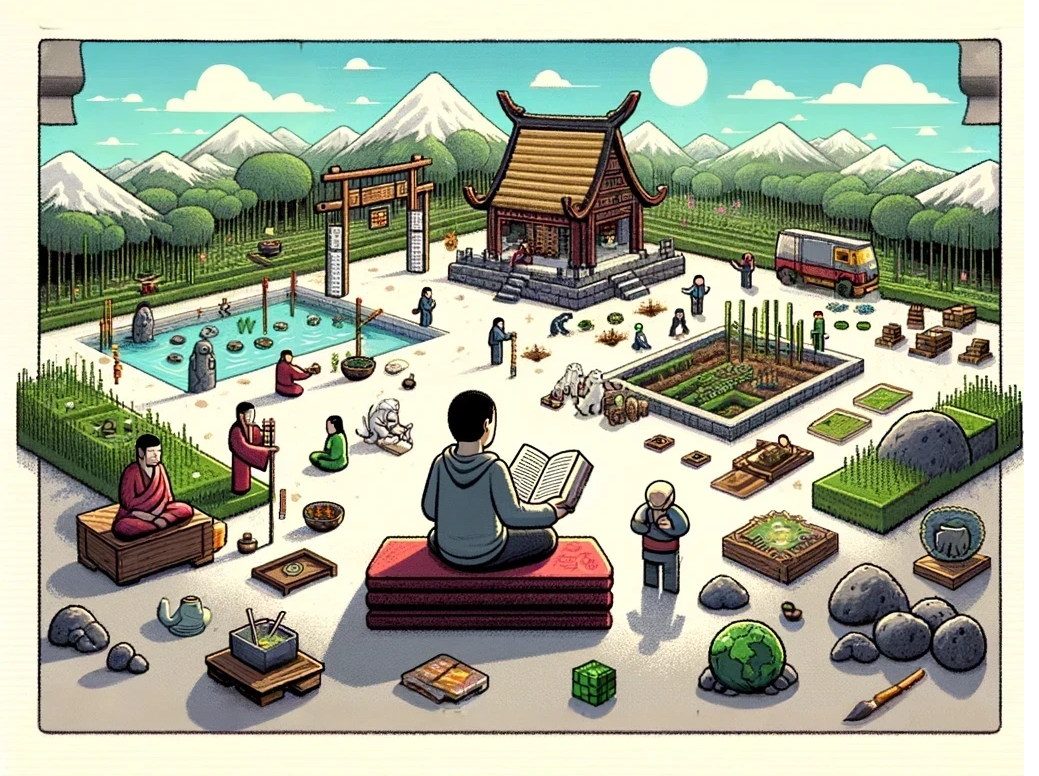
<p>The teachings of Taoism offer a path to spiritual equilibrium by advocating for a life of simplicity, humility, and harmony with nature. Integrating such principles into daily life can be challenging, especially in modern society, where external demands and distractions are omnipresent. It can be done, especially if one takes a relaxed approach and tries to practice them to the extent of one’s ability without, for instance, changing one’s career to something more aligned with nature or giving up a big home where one might be comfortable in favor of a smaller, simpler place. Maybe, for instance, you can’t really afford to leave the city and live closer to nature because of your job or other reasons. However, a relaxed approach to Taoism might mean you could perhaps cultivate some plants inside your home, pay attention to the passing of the day and the people around you, bask in the sun once in a while, or seek comfort under the shade of a tree in a park to meditate.</p>

<p>However, the practice of spiritual principles, no matter how “relaxed” we take them to be, can often be interrupted by life’s circumstances. These interruptions may be fleeting, such as periods of economic worry, or more enduring, rooted in the environment in which one was born. Some people might not have been raised in settings where spiritual principles were emphasized; instead, ambition and the pursuit of knowledge were the primary values they learned. In such environments, the pressures to achieve and succeed can overshadow the importance of spiritual growth and inner peace. This constant drive for external accomplishments can leave little room for introspection and the cultivation of a balanced and harmonious life.</p>

<p>This is where the unique potential of games comes into play. Games can act as an extension of life, providing an alternate environment where spiritual principles can be explored and practiced. These virtual worlds, governed by their own unique rules, offer a sanctuary where players can experiment with and embody spiritual values in ways that may be challenging in their everyday lives. In games, players have the freedom to create their own experiences, set their own goals, and navigate challenges at their own pace. This autonomy allows for a more mindful and intentional approach to gameplay, where the principles of Taoism can be naturally integrated.</p>

<h2 id="taoism-in-game">Taoism in game</h2>

<p><img src="/assets/images/taoist-gameplay/taoism-in-game.webp" alt="Taoism in Game" /></p>

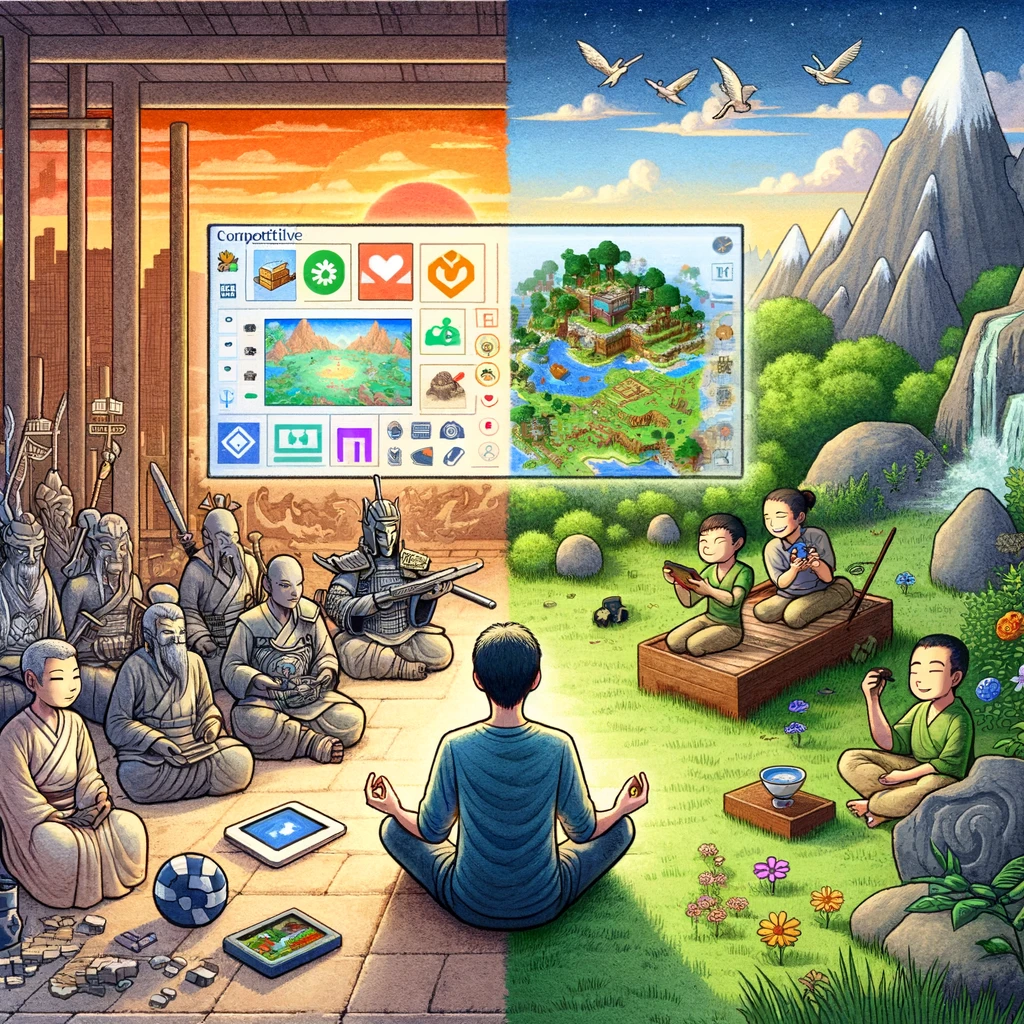
<p>We have established that the search for spiritual grounding often clashes with the demands and distractions of modern life, leaving little room for reflection and inner peace. Similarly, this dynamic is mirrored in the world of gaming, where the design and objectives of most games encourage relentless pursuit of success and dominance. The competitive nature and goal-oriented structure of these games can often overshadow the player’s ability to experience moments of tranquility and balance. However, within this digital landscape, there lies an opportunity to subvert these conventional narratives and explore a more harmonious and mindful approach to gaming, akin to practicing spiritual principles in daily life.</p>

<p>Some, if not most, games naturally incite the player to achieve certain goals or have large ambitions. Take, for instance, Age of Empires, where the main incentive is to be the dominant civilized force in a certain age of humanity. Others have a more blatant approach to large ambitions, encouraging the collection of game badges such as achievements, leader scores, money, or simply defeating the final level and/or boss. Even games with a more peaceful approach, such as farming games (Harvest Moon comes to mind), often incite the player to have <em>more</em> of anything and everything.</p>

<p>In spite of game design, it is possible to subvert most games to experiment with a peaceful and balanced existence. In some games, this might be a short-lived experience. For instance, in a metroidvania game, you might not be able to advance to a different area of the game if you don’t kill all the creatures in your surroundings, and you might find yourself static/trapped in a single area without the possibility of doing anything but avoiding other creatures. Pretty boring, right?</p>

<p>On the other hand, some games (most notably “<a href="https://en.wikipedia.org/wiki/Sandbox_game">sandbox</a>” games) offer a more general-purpose approach, where the objectives are set by the player. Minecraft is such a game. In Minecraft, there are no rules, no final destination, no real meaningful way to “finish” the game. There are indeed Minecraft games that have lasted for years on end. People with no Minecraft experience may think this can turn boring, but people who play in those lasting games often think differently. Games like these offer a simulation of reality that sometimes may be impossible to achieve IRL. It is in these games where Taoist gameplay shines the most.</p>

<blockquote>
  <p>“A sandbox game is a video game with a gameplay element that provides players a great degree of creativity to interact with, usually without any predetermined goal, or alternatively with a goal that the players set for themselves.” (<a href="https://en.wikipedia.org/wiki/Sandbox_game">Wikipedia, Sandbox game</a>)</p>
</blockquote>

<p>The fact that Minecraft does not offer a predefined set of goals does not mean that it doesn’t incite ambition and imposing one’s will over nature. In fact, the game’s name is a hint to players of what they want you to do in the game: “mining and crafting”. Whatever their play style, Minecraft offers the player high things to conquer. For explorers, one of the ultimate goals has always been to travel to the furthest place possible in the game, which can take months or years to achieve depending on your mode of transportation and Minecraft version. For builders, the possibilities of an open world where every block is a possible thing to build with are infinite. Technical players can often be found improving the automation of certain resources or the efficiency of certain “contraptions” such as elevators, flying machines, automatic doors, etc. There are goals for almost any type of player in existence, and the game reinforces some of them through in-game achievements. However, Minecraft does not <em>require</em> you to play this way. You don’t <em>need</em> to play in any certain way in Minecraft, which makes it perfect for experimenting with an ambitionless, joy-of-the-moment type of play style. Here is where Taoist gameplay comes in.</p>

<h2 id="the-nine-practices-in-minecraft">The Nine Practices in Minecraft</h2>

<p>Taoism encompasses various practices that guide individuals toward a life of harmony, balance, and simplicity. These practices can be uniquely explored and practiced within the virtual world of Minecraft, creating a serene and mindful gaming experience. Below are <a href="https://en.wikipedia.org/wiki/Taoism#The_nine_practices"><em>The Nine Taoist Practices</em></a> and how they can be applied in Minecraft.</p>

<ul>
  <li><strong>1. Non-Action (wúwéi 無為):</strong>
    <ul>
      <li><strong>Gameplay:</strong> Focus on organic building and natural landscapes. Let structures evolve naturally rather than forcing intricate designs.</li>
      <li><strong>Activities:</strong> Engage in farming, fishing, and exploring in a relaxed manner, without the rush to achieve goals.</li>
    </ul>
  </li>
  <li><strong>2. Softness and Weakness (róuruò 柔弱):</strong>
    <ul>
      <li><strong>Gameplay:</strong> Embrace a gentle approach to interactions with the environment and creatures. Avoid aggressive actions and focus on harmonious coexistence.</li>
      <li><strong>Activities:</strong> Build with soft, natural materials like wood and leaves. Nurture and care for animals, creating peaceful habitats for them.</li>
    </ul>
  </li>
  <li><strong>3. Embracing the Feminine (shǒucí 行守):</strong>
    <ul>
      <li><strong>Gameplay:</strong> Prioritize inclusive actions by creating a welcoming environment for all players, embracing all genders and backgrounds, as well as all living beings in the game.</li>
      <li><strong>Activities:</strong> Focus on activities that promote growth and opportunities for all players. Create shelters that provide safety and comfort for players and establish areas where even hostile mobs can exist in their natural state, fostering a balance and respect for all aspects of the game world.</li>
    </ul>
  </li>
  <li><strong>4. Being Nameless (wúmíng 無名):</strong>
    <ul>
      <li><strong>Gameplay:</strong> Avoid attaching labels or grandiose names to creations and achievements. Focus on the essence and function rather than the form.</li>
      <li><strong>Activities:</strong> Build simple, functional structures without elaborate decorations. Engage in activities that prioritize utility and practicality over recognition.</li>
    </ul>
  </li>
  <li><strong>5. Clarity and Stillness (qīngjìng 清靜):</strong>
    <ul>
      <li><strong>Gameplay:</strong> Seek quiet and serene environments. Create spaces for meditation and reflection within the game.</li>
      <li><strong>Activities:</strong> Spend time in peaceful activities such as watching sunsets, listening to the in-game sounds of nature, and meditating in tranquil spots.</li>
    </ul>
  </li>
  <li><strong>6. Being Adept (zhūshàn 諸善):</strong>
    <ul>
      <li><strong>Gameplay:</strong> Strive for skillfulness and proficiency in tasks. Focus on mastering simple, repetitive activities that require patience and dedication.</li>
      <li><strong>Activities:</strong> Practice crafting, farming, and building with care and attention to detail. Perfect the art of creating efficient, sustainable systems.</li>
    </ul>
  </li>
  <li><strong>7. Being Desireless (wúyù 無欲):</strong>
    <ul>
      <li><strong>Gameplay:</strong> Avoid the pursuit of excessive resources and material wealth. Focus on enjoying the present moment and what you have.</li>
      <li><strong>Activities:</strong> Live minimally, gathering only what is necessary for survival and comfort. Find joy in simple pleasures like tending a small garden or exploring nearby areas. Avoid any excessive footprint in your environment.</li>
    </ul>
  </li>
  <li><strong>8. Knowing How to Stop and Be Content (zhīzhǐzú 知止足):</strong>
    <ul>
      <li><strong>Gameplay:</strong> Recognize when to stop striving and appreciate the current state of your world. Practice contentment and gratitude for what you have accomplished.</li>
      <li><strong>Activities:</strong> Settle in a comfortable home and enjoy the fruits of your labor. Take breaks to reflect on your progress and express gratitude for the game’s beauty.</li>
    </ul>
  </li>
  <li><strong>9. Yielding and Withdrawing (tuīràng 推讓):</strong>
    <ul>
      <li><strong>Gameplay:</strong> Practice yielding in conflicts and stepping back from aggressive situations. Embrace the power of withdrawal and strategic retreat.</li>
      <li><strong>Activities:</strong> Avoid confrontations with hostile mobs. Instead, build safe havens and create escape routes. Focus on defensive strategies and peaceful resolutions.</li>
    </ul>
  </li>
</ul>

<h2 id="a-word-on-taoism-and-diversity">A word on Taoism and diversity</h2>

<p>The gaming community, despite its global reach and diversity, still faces significant challenges in creating an inclusive and respectful environment for all players. Issues related to sex, gender, race, nationality, and other backgrounds persist, making it difficult for some players to feel welcomed and respected. To foster a truly inclusive gaming culture, it is essential not only to acknowledge the presence of diverse players but also to actively invite and support them, ensuring a respectful and welcoming environment.</p>

<p>Taoism offers a compelling philosophical foundation for promoting inclusivity and gender equality within the gaming community. Unlike many traditional worldviews, Taoism does not construct a hierarchy where the male dominates the female; instead, Taoism highlights the complementary nature of yin and yang, representing femininity and masculinity, respectively (Moeller, 2012, pp. 303-304). These concepts are depicted as equally valuable, each contributing unique and necessary qualities to the balance of the universe.</p>

<p>Taoist texts often highlight the positive aspects of the feminine, providing a philosophical basis for non-patriarchal or even matriarchal perspectives. Contemporary gender ethics have drawn on Taoist principles to challenge Western patriarchal constructs, demonstrating that male domination is not a natural given but a cultural construct with viable alternatives (Moeller, 2012, p. 304).</p>

<p><img src="/assets/images/taoist-gameplay/diversity.webp" alt="Diversity" /></p>

<p>Applying Taoist principles to the gaming community can significantly enhance inclusivity. The Taoist concept of <strong>Embracing the Feminine (shǒucí 行守)</strong> can be reinterpreted through the notion of yin and yang to foster an environment where welcoming, nurturing, and protective actions are not seen as inherently feminine but as essential human qualities. After all, we can all probably think of all kinds of people, not just women, who are welcoming, nurturing, and protective. For instance, think of <a href="https://en.wikipedia.org/wiki/Lee_Everett"><strong>Lee Everett</strong></a> from <em>The Walking Dead</em> video game series, who takes on a nurturing and protective role for Clementine, guiding and safeguarding her through the perils of a post-apocalyptic world. By recognizing and valuing these qualities in all individuals, the gaming community can create a more inclusive and supportive environment for everyone. Here are some practical steps:</p>

<ol>
  <li><strong>Active Invitation and Respect:</strong>
    <ul>
      <li>Make a conscious effort to invite players from underrepresented groups, including women, into your gaming sessions. Acknowledge their presence and contributions, ensuring they feel valued and respected.</li>
      <li>Use inclusive language and avoid any form of discriminatory or derogatory remarks. Respect everyone’s identity and background.</li>
    </ul>
  </li>
  <li><strong>Creating Safe Spaces:</strong>
    <ul>
      <li>Establish and maintain gaming environments that are free from harassment and toxicity. Implement and enforce community guidelines that promote respect and inclusivity.</li>
      <li>Encourage positive behavior and address any instances of bullying or discrimination promptly and effectively.</li>
    </ul>
  </li>
  <li><strong>Promoting Growth and Healing:</strong>
    <ul>
      <li>Design in-game activities and events that foster cooperation and mutual support. Emphasize collaborative goals that require teamwork and collective effort.</li>
      <li>Recognize and celebrate the achievements of all players, providing positive reinforcement and encouragement.</li>
    </ul>
  </li>
</ol>

<p>By integrating these principles, particularly the value placed on the complementary nature of yin and yang, the gaming community can move towards a more inclusive and respectful environment. It is not enough to merely have diverse players present; there must be an active effort to create a welcoming and supportive atmosphere. Through deliberate actions and a commitment to inclusivity, the gaming community can become a place where all players, regardless of their background, can thrive and enjoy their gaming experiences. Embracing these values not only enhances the gaming culture but also sets a powerful example of equality and respect for other aspects of society.</p>

<h2 id="methodology">Methodology</h2>

<p><img src="/assets/images/taoist-gameplay/methodology.png" alt="Methodology" /></p>

<ol>
  <li>Set your game mode to “Hardcore” to emphasize the fleeting nature of existence and to get the chance to practice different aspects of Taoism each time. If you are not good at survival, you can choose a different game mode.</li>
  <li>Before creating your new world, purposely read a chapter of the Tao Te Ching or the Zhuangzi. In Taoist gameplay, the player begins their Minecraft session by reading a chapter from the classic Taoist texts. Chapters are small enough so that this doesn’t get tedious and they often encompass one single topic. The objective is to practice the principles outlined in that chapter during this life (in hardcore mode). This immersive approach encourages players to integrate Taoist philosophy directly into their in-game actions and decisions, enriching their experience with deep, meaningful engagement.
  	-  The classic text <strong>Zhuangzi</strong> (or <strong>Chuang Tzŭ</strong>) by Zhuangzi, translated by <a href="https://en.wikisource.org/wiki/Author:Herbert_Allen_Giles" title="Author:Herbert Allen Giles">Herbert Allen Giles</a> is in public domain and a version is hosted at: <a href="https://en.wikisource.org/wiki/Chuang_Tz%C5%AD_(Giles)">https://en.wikisource.org/wiki/Chuang_Tz%C5%AD_(Giles)</a>
    <ul>
      <li>The classic text <strong>Tao Te Ching</strong> (<a href="https://en.wikipedia.org/wiki/Wade-Giles" title="w:Wade-Giles">Wade</a>), <em>Daodejing</em> (<a href="https://en.wikipedia.org/wiki/pinyin" title="w:pinyin">pinyin</a>), or Tâo Teh King by <a href="https://en.wikisource.org/wiki/Author:Laozi" title="Author:Laozi">Laozi</a>, translated by <a href="https://en.wikisource.org/wiki/Author:James_Legge" title="Author:James Legge">James Legge</a> is in public domain and a version is hosted at: <a href="https://en.wikisource.org/wiki/T%C3%A2o_Teh_King">https://en.wikisource.org/wiki/T%C3%A2o_Teh_King</a></li>
    </ul>
  </li>
  <li>Game progression:
    <ul>
      <li>Begin with minimal resources. Gradually gather materials only when needed.</li>
      <li>Focus on sustainable living from the start, planting trees and crops early on.</li>
    </ul>
  </li>
  <li>Follow The Nine Practices to the best of your ability:
    <ul>
      <li>Integrate The Nine Principles in your gameplay.</li>
      <li>Make an active effort to create a welcoming and supportive atmosphere for all players, thus embodying the extended view of the third principle.</li>
      <li>Nobody is asking for perfection. Just do your best and take it slowly.</li>
    </ul>
  </li>
  <li>Daily Routines:
    <ul>
      <li>Set a daily routine that includes meditation or quiet reflection times.</li>
      <li>Balance work and rest, ensuring not to over-exert in any task.</li>
    </ul>
  </li>
  <li>Interaction with Environment and Players:
    <ul>
      <li>Interact with the environment respectfully, avoiding unnecessary destruction of nature.</li>
      <li>Collaborate with other players to create a harmonious community, sharing resources and knowledge.</li>
    </ul>
  </li>
  <li>Reflection and Adaptation:
    <ul>
      <li>Keep a Minecraft journal to reflect on how the principles of Taoism are being experienced in your gameplay.</li>
      <li>Adjust your gameplay based on reflections, ensuring you stay aligned with Taoist principles.</li>
    </ul>
  </li>
</ol>

<h2 id="final-thoughts">Final thoughts</h2>

<p>In Minecraft, players can choose to focus on simple living, building modest shelters, and cultivating gardens. They can choose to flow with the game’s natural processes, such as the day-night cycle and seasonal changes, rather than imposing their will upon the world. This mode of play fosters a sense of harmony and balance, mirroring the Taoist ideal of living in sync with the natural world. Moreover, the temporary nature of in-game progress and the potential for loss in Hardcore mode underscore the Taoist understanding of impermanence and the importance of living in the moment.</p>

<p>By navigating these digital realms, individuals have the opportunity to reflect on and integrate these principles into their consciousness. The lessons learned in virtual worlds can translate to real-life practices, encouraging a more mindful and balanced approach to daily living. Players can carry the ethos of simplicity, humility, and harmony from their gaming experiences into their real-world interactions and decisions. In this way, games not only provide an escape from the pressures of modern life but also serve as valuable tools for spiritual growth and the practice of Taoist principles.</p>

<p>Through the lens of gaming, Taoism can be experienced in a tangible and accessible way, offering a bridge between ancient wisdom and contemporary life. By embracing the principles of Taoism in both virtual and real worlds, individuals can cultivate a deeper sense of peace, balance, and harmony, enriching their overall well-being and fostering a more meaningful connection with the world around them.</p>

<p><img src="/assets/images/taoist-gameplay/final-thoughts.webp" alt="Final Thoughts" /></p>

<h2 id="acknowledgements">Acknowledgements</h2>

<p>I would like to extend my sincere thanks to several individuals and tools that made this blog post possible:</p>

<ol>
  <li><strong>OpenAI’s ChatGPT-4o</strong>: For brainstorming ideas, assisting with redaction and copy editing, and creating the images. All images in this blog post were generated with the help of ChatGPT-4o.</li>
  <li><strong>Reviewers</strong>: A heartfelt thank you to robot3humans0, Tanz31, and YeetPreyLove for their invaluable feedback and suggestions. Any remaining mistakes are entirely my own.</li>
</ol>

<p>Your contributions have greatly enhanced the quality and clarity of this work. Thank you for your support and insights.</p>

<h2 id="references">References</h2>

<p>Hoff, Shepard, &amp; Shepard, Ernest H. (1983). <em>The Tao of Pooh</em>. Penguin Books.</p>

<p>Moeller, H.-G. (2012). Taoism. In <em>Encyclopedia of Applied Ethics</em> (pp. 298–305). Elsevier. <a href="https://doi.org/10.1016/B978-0-12-373932-2.00217-9">https://doi.org/10.1016/B978-0-12-373932-2.00217-9</a></p>

<p>Wikipedia Contributors. (n.d.). Lee Everett. In <em>Wikipedia, The Free Encyclopedia</em>. Retrieved June 9, 2024, from https://en.wikipedia.org/wiki/Lee_Everett</p>

<p>Wikipedia Contributors. (n.d.). Sandbox game. In <em>Wikipedia, The Free Encyclopedia</em>. Retrieved June 9, 2024, from https://en.wikipedia.org/wiki/Sandbox_game</p>

<p>Wikipedia Contributors. (n.d.). Taoism. In <em>Wikipedia, The Free Encyclopedia</em>. Retrieved June 9, 2024, from <a href="https://en.wikipedia.org/wiki/Taoism">https://en.wikipedia.org/wiki/Taoism</a></p>]]></content><author><name>Damian Romero</name></author><category term="blog" /><category term="Minecraft" /><category term="Taoism" /><category term="Experimental" /><category term="Gaming" /><summary type="html"><![CDATA[A gaming experiment on how to integrate Taoist principles into Minecraft gameplay, creating a balanced and mindful experience in both virtual and real worlds.]]></summary></entry><entry><title type="html">How to Install Minecraft Modpacks Using Prism Launcher</title><link href="https://damian-romero.github.io//blog/minecraft-how-to-install-modpacks-using-prism-launcher/" rel="alternate" type="text/html" title="How to Install Minecraft Modpacks Using Prism Launcher" /><published>2024-05-31T00:00:00+00:00</published><updated>2024-05-31T00:00:00+00:00</updated><id>https://damian-romero.github.io//blog/minecraft-how-to-install-modpacks-using-prism-launcher</id><content type="html" xml:base="https://damian-romero.github.io//blog/minecraft-how-to-install-modpacks-using-prism-launcher/"><![CDATA[<p>This guide will walk you through the process of installing modpacks using Prism Launcher, specifically focusing on how to get the Gaia’s Riddle modpack up and running.</p>

<p>Gaia’s Riddle is a new modpack created by <a href="https://www.curseforge.com/members/bartssimon/projects">Dr. Bart Simon</a> and collaborators from the <a href="https://tag.hexagram.ca/">TAG Bloc academic group</a> at the <a href="https://milieux.concordia.ca/">Milieux institute for arts, culture and technology</a>. You will find my Gaia’s Riddle Let’s Play YouTube series at: <a href="https://www.youtube.com/@TypoMC">https://www.youtube.com/@TypoMC</a>.</p>

<p>This is the description of the <a href="https://www.curseforge.com/minecraft/modpacks/gaias-riddle">Gaia’s Riddle modpack</a> directly from the CourseForge website:</p>

<blockquote>
  <p>A moderately sized modpack featuring mods with dynamic environment mechanics like Pollution of the Realms, Serene Seasons, ColdSweat and Weather, Storms and Tornados.  These are combined with tech/magic progression mods Mekanism, Pneumaticraft, Embers Rekindled and Nature’s Aura to create a multiplayer game in which players consider whether to try and control and dominate nature or work with its vicarious conditions. Players will explore and build in a world which feels alive and is not always at the players beck and call. When you are ready, you can even activate the Solar Apocalypse.</p>
</blockquote>

<blockquote>
  <p>Exploration in the environmental theme features dimension mods like The Aether, StarGate Journey and Alex Caves as well as less popular world gen mods such as Regions Unexplored, [Lets do] Blooming Nature and Biome Makeover. There are also ample group boss activities with the Aether, and L_Ender’s Cataclysm and plenty of useful mods for making the solarpunk base of your dreams.</p>
</blockquote>

<h2 id="steps-to-install-modpacks-using-prism-launcher">Steps to Install Modpacks Using Prism Launcher</h2>

<h3 id="i-install-prism-launcher">I. Install Prism Launcher</h3>

<p>First, you’ll need to install Prism Launcher. Follow these steps:</p>

<ol>
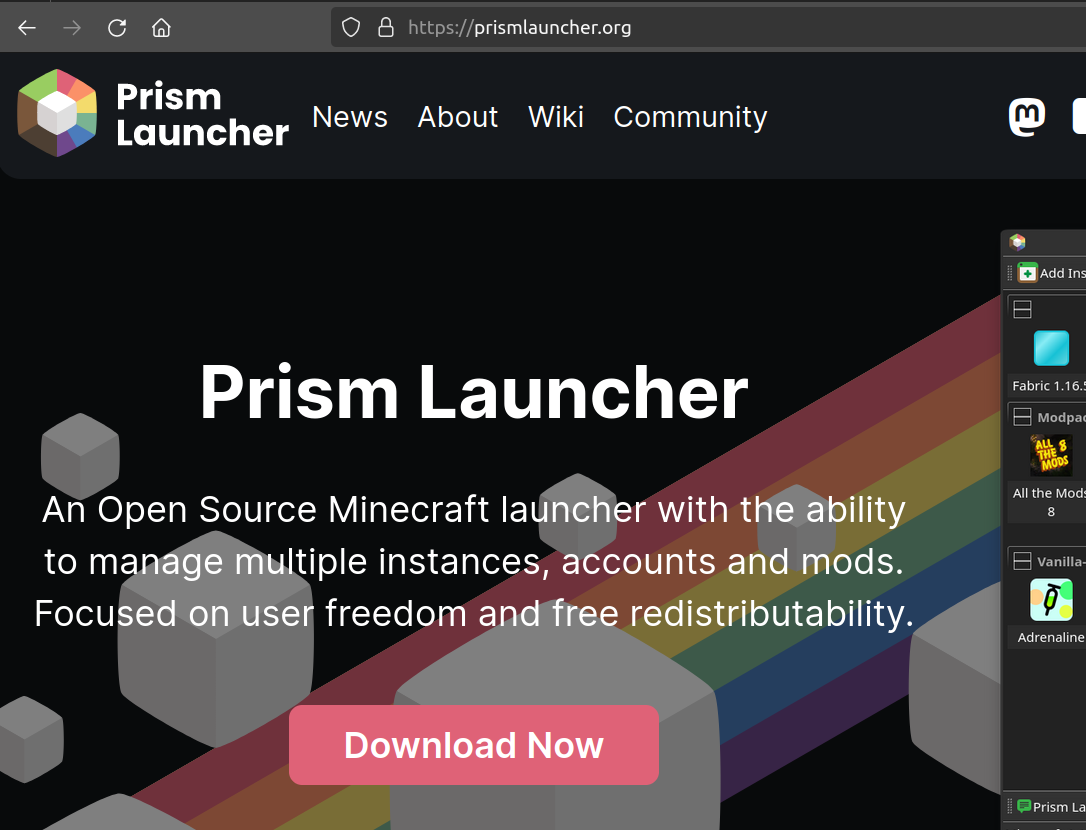
  <li>Go to the <a href="https://prismlauncher.org/">Prism Launcher website</a> and download the launcher appropriate for your operating system.</li>
  <li>Install the launcher by following the on-screen instructions.</li>
</ol>

<p><img src="/assets/images/install-prism-launcher.png" alt="Install Prism Launcher" /></p>

<h3 id="ii-download-gaias-riddle-modpack">II. Download Gaia’s Riddle Modpack</h3>

<p>Next, you’ll need to download the modpack you want to use. In this case, we’ll use Gaia’s Riddle:</p>

<ol>
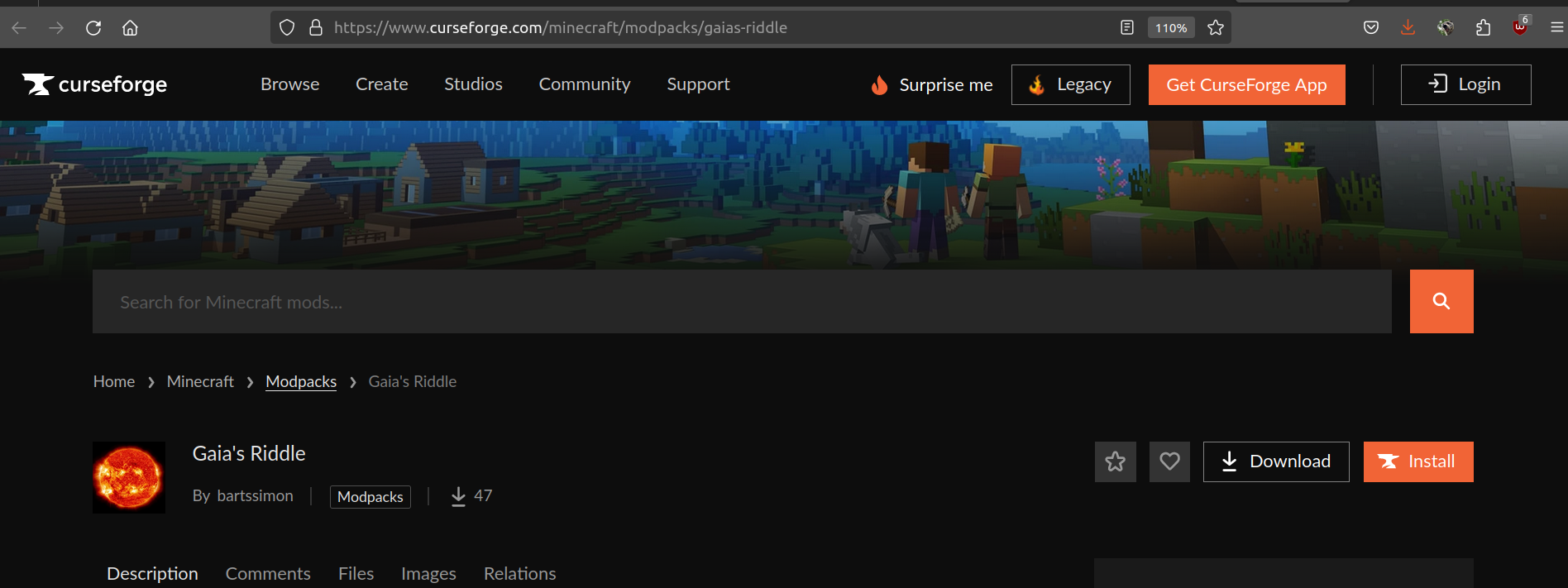
  <li>Visit the <a href="https://www.curseforge.com/minecraft/modpacks/gaias-riddle">Gaia’s Riddle page on CurseForge</a>.</li>
  <li>Download the Gaia’s Riddle-1.6.zip file (or later version) to your computer.</li>
</ol>

<p><img src="/assets/images/download-gaias-riddle.png" alt="Download Gaia's Riddle Modpack" /></p>

<h3 id="iii-add-a-new-minecraft-instance-in-prism-launcher">III. Add a New Minecraft Instance in Prism Launcher</h3>

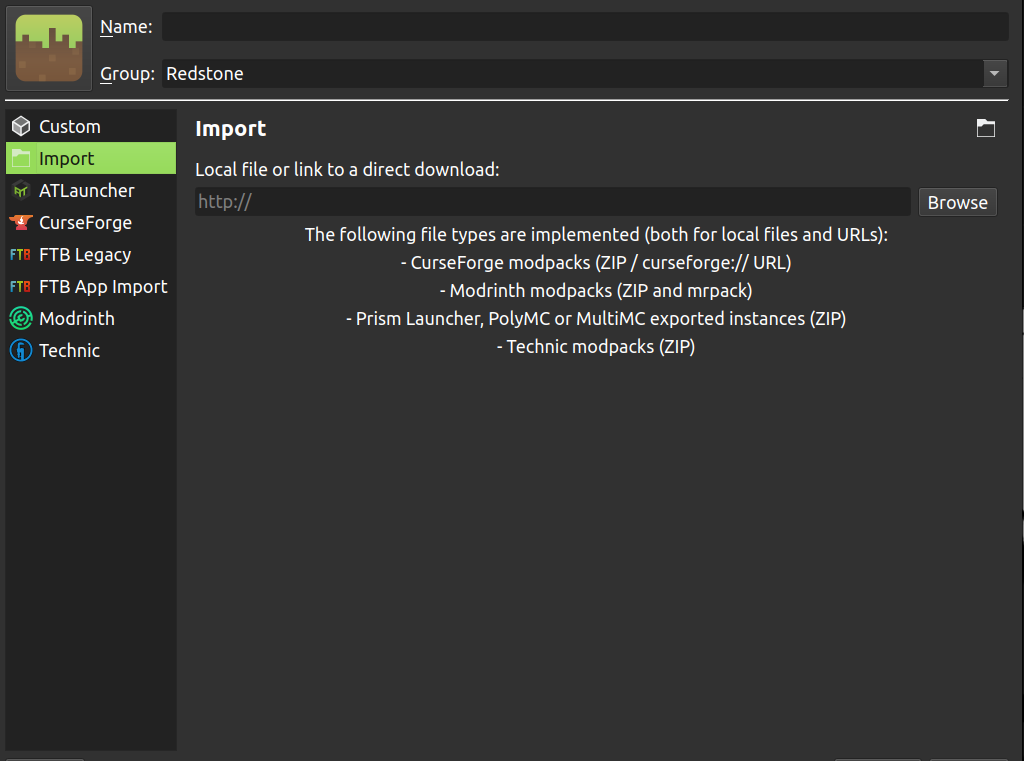
<p>Now, let’s add a new Minecraft instance in Prism Launcher using the import function:</p>

<ol>
  <li>Open Prism Launcher.</li>
  <li>Click on the “Instances” tab.</li>
  <li>Click on “Import from zip” and select the Gaia’s Riddle-1.6.zip or (later version) file you downloaded.</li>
</ol>

<p><img src="/assets/images/import-modpack.png" alt="Import Modpack in Prism Launcher" /></p>

<h3 id="iv-handling-optional-mod-packs">IV. Handling Optional Mod Packs</h3>

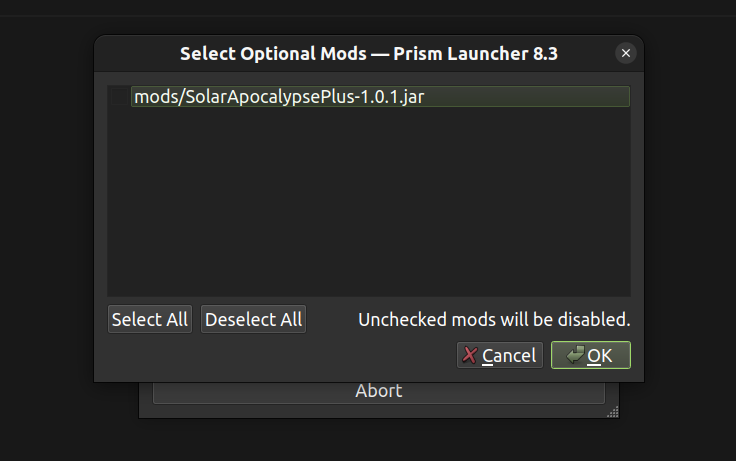
<p>If there are any optional mod packs, a pop-up window will appear. For Gaia’s Riddle, make sure to leave the optional modpack SolarApocalipsePlus unchecked:</p>

<ol>
  <li>When prompted, uncheck the “SolarApocalipsePlus” option.</li>
</ol>

<p><img src="/assets/images/optional-mod-packs.png" alt="Optional Mod Packs Pop-up" /></p>

<h3 id="v-customize-ram-allocation">V. Customize RAM Allocation</h3>

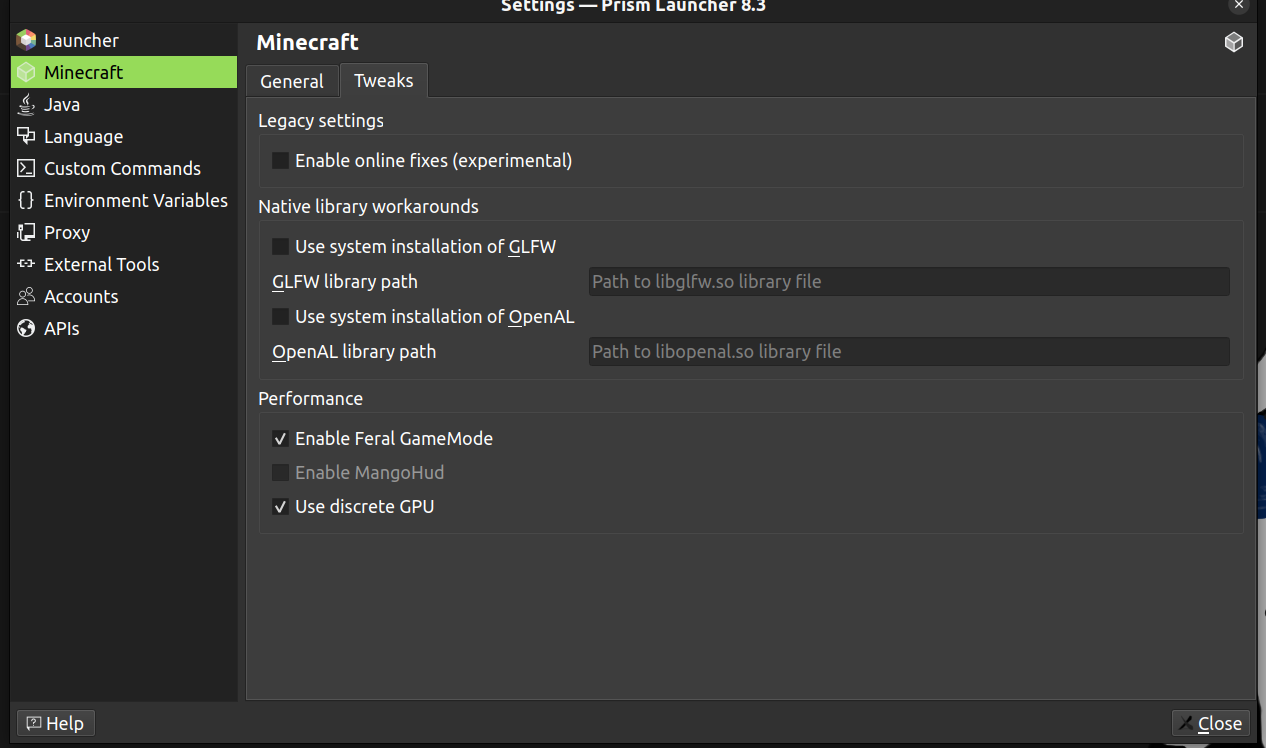
<p>To ensure the game runs smoothly, you need to customize the RAM allocation:</p>

<ol>
  <li>Right-click on the new Gaia’s Riddle icon that appears in your Prism Launcher.</li>
  <li>Click on “Edit”.</li>
</ol>

<p><img src="/assets/images/edit-mc-instance.png" alt="Edit Minecraft Instance" /></p>

<h3 id="vi-adjust-memory-settings">VI. Adjust Memory Settings</h3>

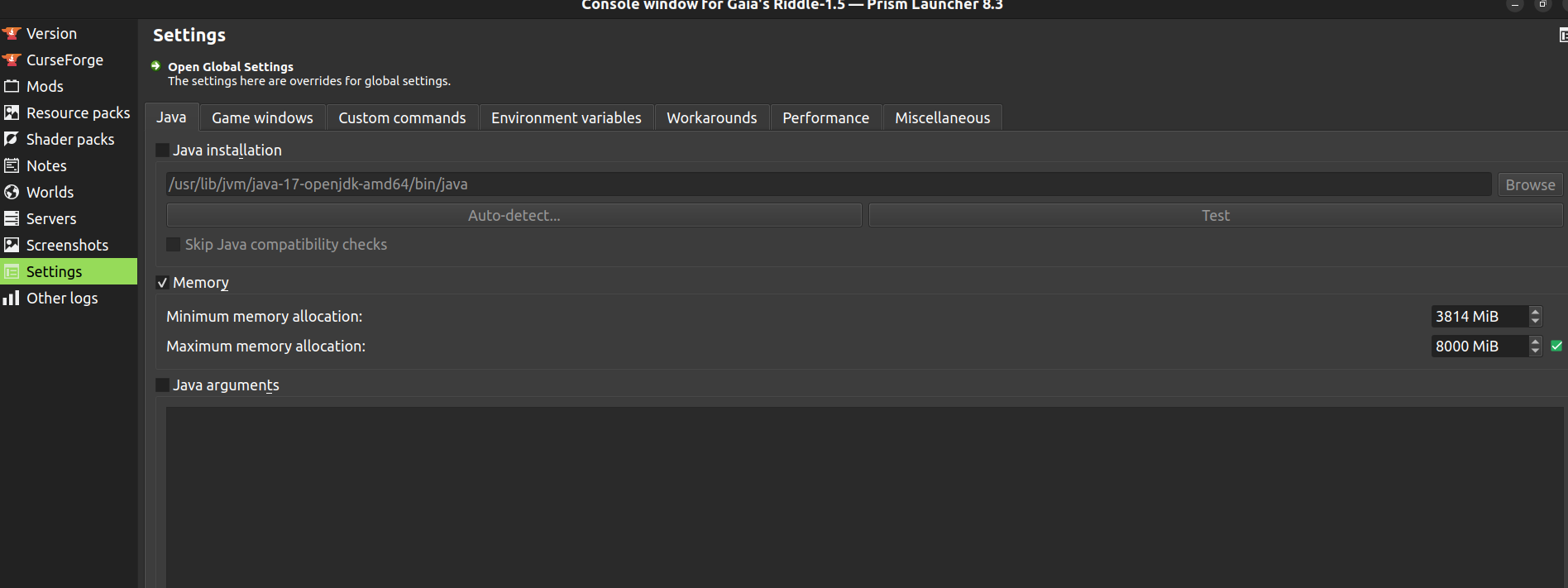
<p>Finally, adjust the memory settings to allocate the appropriate amount of RAM:</p>

<ol>
  <li>Inside the settings, look for the menu on the left and click on “Settings”.</li>
  <li>Click on the “Memory” button.</li>
  <li>Change the “Maximum memory allocation” to a value between 6000 MiB and 9000 MiB. For Gaia’s Riddle, 6000 MiB is the minimum recommended amount.</li>
</ol>

<p><img src="/assets/images/adjust-memory-settings.png" alt="Adjust Memory Settings" /></p>

<h3 id="vii-launch-the-game">VII. Launch the Game</h3>

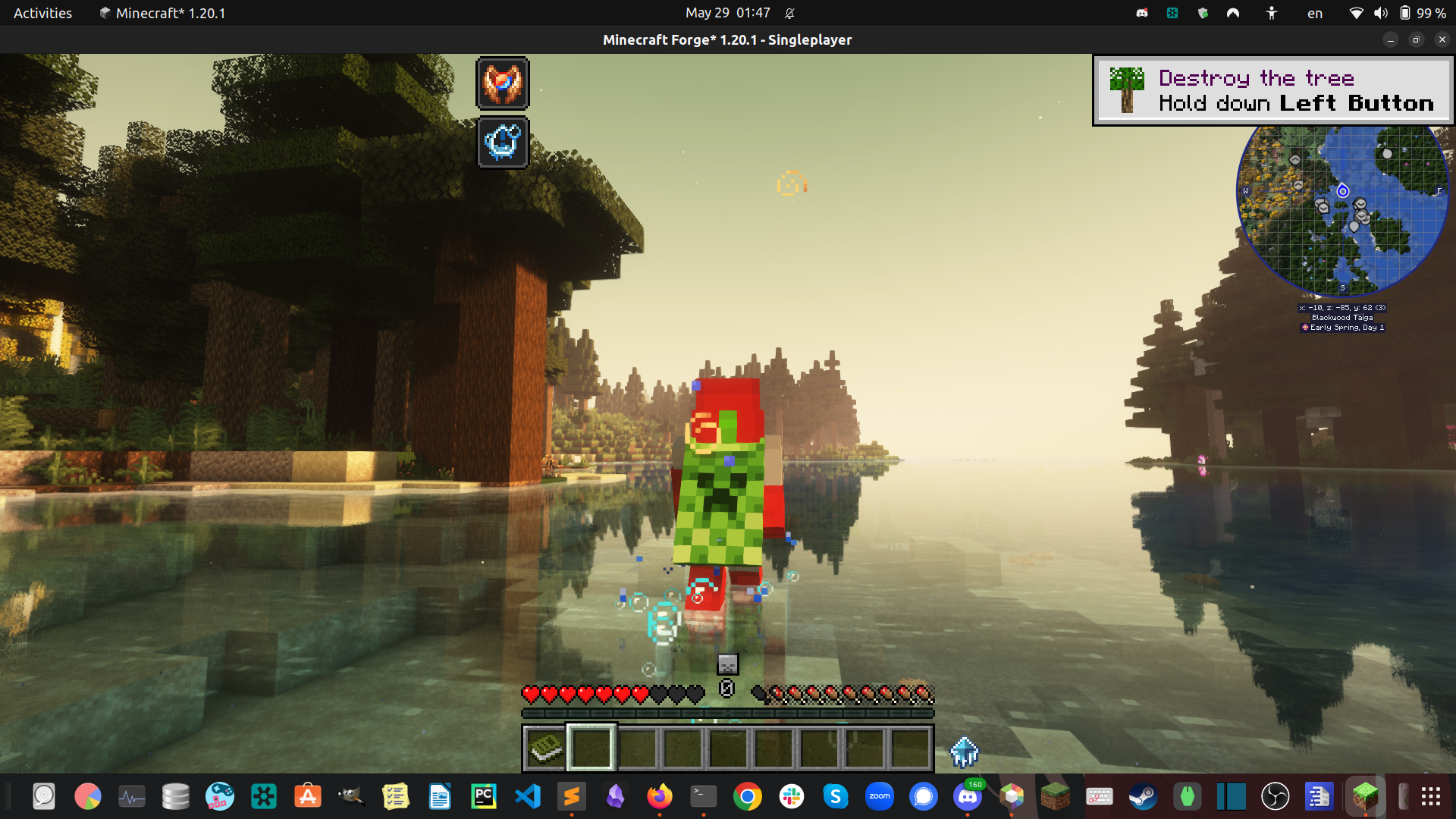
<p>Once you have completed these steps, you are ready to play:</p>

<ol>
  <li>Double-click the Gaia’s Riddle icon in Prism Launcher.</li>
  <li>Enjoy your game!</li>
</ol>

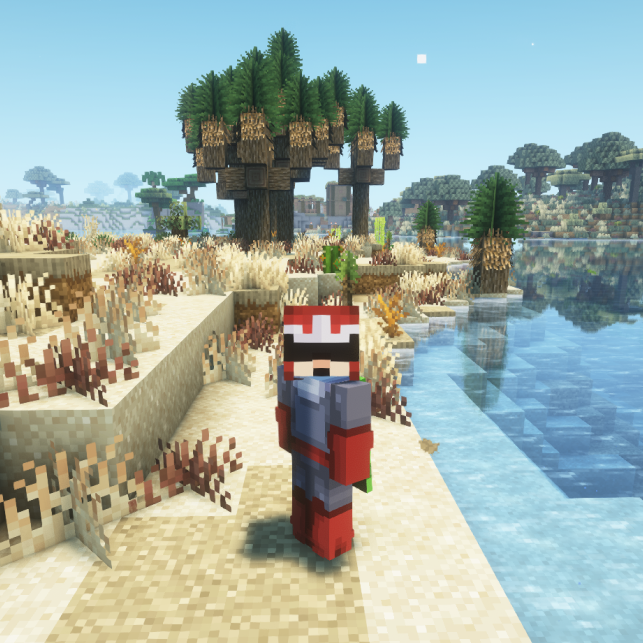
<p><img src="/assets/images/welcome-to-gaias-riddle.png" alt="Launch Minecraft" /></p>

<h2 id="conclusion">Conclusion</h2>

<p>That’s it! You have successfully installed Gaia’s Riddle using Prism Launcher. Happy gaming!</p>]]></content><author><name>Damian Romero</name></author><category term="blog" /><category term="Minecraft" /><category term="Modpacks" /><category term="Prism Launcher" /><category term="Gaming" /><summary type="html"><![CDATA[Learn how to effortlessly install Minecraft modpacks, including Gaia's Riddle, using Prism Launcher with this step-by-step guide.]]></summary></entry><entry><title type="html">Solve macOS BigSur ‘xcrun: error’ and fix Jekyll/Homebrew environment issues after update</title><link href="https://damian-romero.github.io//blog/solve-xcrun-error-and-fix-jekyll-environment-after-macos-bigsur-update/" rel="alternate" type="text/html" title="Solve macOS BigSur ‘xcrun: error’ and fix Jekyll/Homebrew environment issues after update" /><published>2020-12-29T22:00:00+00:00</published><updated>2020-12-29T22:00:00+00:00</updated><id>https://damian-romero.github.io//blog/solve-xcrun-error-and-fix-jekyll-environment-after-macos-bigsur-update</id><content type="html" xml:base="https://damian-romero.github.io//blog/solve-xcrun-error-and-fix-jekyll-environment-after-macos-bigsur-update/"><![CDATA[<p><em>If you only want the solution of the issue at hand, I suggest skipping to the <a href="#full-fix">“Full fix”</a> section.</em></p>

<h2 id="background-and-some-tips-on-updating-your-operating-system">Background and some tips on updating your operating system</h2>

<p>When a new version of an operating system comes out, I usually don’t install it right away unless it’s absolutely necessary. So when Apple rolled out its latest macOS (BigSur) back in November 2020, I decided to wait, especially since the University of Arizona warned its employees that there might be some compatibility issues regarding <a href="https://www.sophos.com/">Sophos security software</a> (which I use).</p>

<p>However, it is finally winter break, and it was time to update to the newest OS. I knew I would have to fix several things in my development environment, so I <strong>backed up my computer to an external drive</strong> just in case I needed to revert to my previous OS for any reason.</p>

<p>When I finally updated to BigSur, I was happy that I delayed my update because Sophos, Anaconda, and Git were all working correctly. However, I wanted to add some content to my website, and that is where I hit the jackpot. The command <code class="language-plaintext highlighter-rouge">bundle exec jekyll serve</code> was not working. Here is what happened and how I was able to solve the issue:</p>

<h2 id="full-fix">Full fix</h2>

<p>After updating to BigSur, I wanted to add content to my website, so I went through the usual steps:</p>

<div class="language-bash highlighter-rouge"><div class="highlight"><pre class="highlight"><code>bundle <span class="nb">exec </span>jekyll serve
</code></pre></div></div>

<p>This resulted in the following error:</p>

<div class="language-plaintext highlighter-rouge"><div class="highlight"><pre class="highlight"><code>Could not find concurrent-ruby-1.1.7 in any of the sources
Run `bundle install` to install missing gems.
</code></pre></div></div>

<p>Just running <code class="language-plaintext highlighter-rouge">bundle install</code> will throw a permission error, so I ran it with sudo:</p>

<div class="language-plaintext highlighter-rouge"><div class="highlight"><pre class="highlight"><code>sudo bundle install
</code></pre></div></div>

<p>But this failed again with:</p>

<div class="language-plaintext highlighter-rouge"><div class="highlight"><pre class="highlight"><code>An error occurred while installing json (2.3.1), and Bundler cannot continue.
Make sure that `gem install json -v '2.3.1' --source 'https://rubygems.org/'` succeeds before bundling
</code></pre></div></div>

<p>However, running <code class="language-plaintext highlighter-rouge">gem install json -v '2.3.1' --source 'https://rubygems.org/</code> also failed, prompting me to <code class="language-plaintext highlighter-rouge">install ruby-dev</code> or <code class="language-plaintext highlighter-rouge">ruby-devel</code>, so I tried to update brew first and see what happened:</p>

<div class="language-bash highlighter-rouge"><div class="highlight"><pre class="highlight"><code>brew update
</code></pre></div></div>

<p>Sure enough, I got to the root of the problem when I hit a <code class="language-plaintext highlighter-rouge">missing xcrun</code> error:</p>

<div class="language-plaintext highlighter-rouge"><div class="highlight"><pre class="highlight"><code>invalid active developer path (/Library/Developer/CommandLineTools), missing xcrun at: /Library/Developer/CommandLineTools/usr/bin/xcrun
</code></pre></div></div>

<p><a href="https://dev.to/o9uzdev/macos-xcrun-error-invalid-active-developer-path-missing-xcrun-411a">Googling around</a>, it turned out that the issue could be solved simply by re-installing xcode (step 1 in the <a href="https://jekyllrb.com/docs/installation/macos/">Jekyll documentation pre-requisites</a>)</p>

<div class="language-bash highlighter-rouge"><div class="highlight"><pre class="highlight"><code>xcode-select <span class="nt">--install</span>
</code></pre></div></div>

<p>Later, I found out that I needed to make one small change to my <code class="language-plaintext highlighter-rouge">.gitignore</code> file. I needed to add <a href="https://jekyllrb.com/tutorials/using-jekyll-with-bundler/">the full <code class="language-plaintext highlighter-rouge">/vendor/</code> directory</a> as opposed to just the <code class="language-plaintext highlighter-rouge">/vendor/bundle</code> which was sufficient in macOs Catalina:</p>

<div class="language-diff highlighter-rouge"><div class="highlight"><pre class="highlight"><code><span class="gh">diff --git a/.gitignore b/.gitignore
index 7d3f845..68a8ee8 100644
</span><span class="gd">--- a/.gitignore
</span><span class="gi">+++ b/.gitignore
</span><span class="p">@@ -77,6 +77,7 @@</span> build-iPhoneSimulator/
 
 ## Environment normalization:
 /.bundle/
<span class="gi">+/vendor/
</span> /vendor/bundle
 /lib/bundler/man/
</code></pre></div></div>

<p>Now you can just run <code class="language-plaintext highlighter-rouge">bundle install</code> (no sudo!) and this will get the correct configuration for your project.</p>

<div class="language-bash highlighter-rouge"><div class="highlight"><pre class="highlight"><code>bundle <span class="nb">install
</span>bundle <span class="nb">exec </span>jekyll serve
</code></pre></div></div>

<p><strong>Note that you do not need to install the <code class="language-plaintext highlighter-rouge">ruby-dev</code> or <code class="language-plaintext highlighter-rouge">ruby-devel</code> environments.</strong></p>

<p>Also, as a side-effect, your <code class="language-plaintext highlighter-rouge">Homebrew</code> environment is also fixed.</p>

<div class="language-bash highlighter-rouge"><div class="highlight"><pre class="highlight"><code>brew update
<span class="c"># works</span>
</code></pre></div></div>

<h2 id="takeaways">Takeaways</h2>

<p>When updating to a new OS, I will minimally follow the checklist below:</p>

<ul>
  <li>Get information about the new release.
    <ul>
      <li>Pay attention to what the developers of your most frequently used tools say about a new big release. In my case these are:
        <ul>
          <li>Python, Anaconda, Homebrew, Git &amp; GitHub, my antivirus software, among others</li>
        </ul>
      </li>
      <li>(Re)read all IT team’s emails regarding the subject.</li>
      <li>Search the internet for possible issues of switching too quickly.</li>
    </ul>
  </li>
  <li>If possible, allow 3-6 months before installing a big release.
    <ul>
      <li>For security reasons, smaller releases should almost always be installed asap, except when there is a known security issue.</li>
    </ul>
  </li>
  <li>Make sure I have enough time to back up and solve any issues that might come up during or after the process.</li>
  <li>Back up my computer right before updating my OS (apart from my weekly backup).</li>
  <li>Once I have completed my backup and before working on anything else, i will check that my most essential tools are working correctly.</li>
</ul>

<h2 id="thats-it">That’s it!</h2>

<p>I hope this is useful for people trying to fix their Jekyll environments.</p>

<p>Special thanks to <a href="https://dev.to/o9uzdev">o9uz.dev</a> for <a href="https://dev.to/o9uzdev/macos-xcrun-error-invalid-active-developer-path-missing-xcrun-411a">this post</a> in dev.to and to Ernest Ojeh for <a href="https://ernestojeh.com/fix-jekyll-on-macos-big-sur">this post</a> pre-<a href="https://brew.sh/2020/12/01/homebrew-2.6.0/">2.60 homebrew</a>, and of course to all the folks at Apple and Homebrew. So far I am enjoying my BigSur experience.</p>

<p>And remember to…</p>

<p>Jump higher!</p>

<p>- Damian</p>

<!-- <p>
  <img alt="Visitors" src="https://visitor-badge.glitch.me/badge?page_id=damian-romero/damian-romero.github.io/blob/master/_posts/2020-12-29-solve-xcrun-error-and-fix-jekyll-environment-after-macos-bigsur-update.md" />
</p> -->]]></content><author><name>Damian Romero</name></author><category term="blog" /><category term="Jekyll" /><category term="Homebrew" /><category term="update" /><category term="website" /><category term="meta" /><category term="macOS BigSur" /><category term="xcrun error" /><summary type="html"><![CDATA[Here is how I fixed my Jekyll (and Homebrew) environments on macOS BigSur and some tips on what to do before updating your Operating System.]]></summary></entry><entry><title type="html">How I built this website</title><link href="https://damian-romero.github.io//blog/how-i-built-this-website/" rel="alternate" type="text/html" title="How I built this website" /><published>2020-12-26T22:00:00+00:00</published><updated>2020-12-26T22:00:00+00:00</updated><id>https://damian-romero.github.io//blog/how-i-built-this-website</id><content type="html" xml:base="https://damian-romero.github.io//blog/how-i-built-this-website/"><![CDATA[<p>This is a very quick walkthrough of how I built this website in an afternoon using the <a href="https://github.com/mmistakes/minimal-mistakes"><code class="language-plaintext highlighter-rouge">Minimal Mistakes template</code></a> for Jekyll. Read this article to learn more!</p>

<p>I have summarized the steps to the bare minimum you need to get started with your own website. For more detailed/additional information you can always consult the <a href="#resources">resources section</a> below.</p>

<p>For this project I used a machine running MacOs Catalina. These steps may or may not work depending on your Operating System and version.</p>

<h2 id="minimal-steps-i-took">Minimal steps I took:</h2>

<h3 id="i-install-prerequisites">I. Install Prerequisites</h3>

<p>I installed the <a href="https://jekyllrb.com/docs/installation/macos/">Jekyll prerequisites for MacOs</a> (reproduced below). You can also look at the official prerequisites documentation <a href="https://jekyllrb.com/docs/installation/">here</a>.</p>

<div class="language-bash highlighter-rouge"><div class="highlight"><pre class="highlight"><code><span class="c">## Install xcode if you haven't</span>
xcode-select <span class="nt">--install</span>

<span class="c"># You will need homebrew</span>
/bin/bash <span class="nt">-c</span> <span class="s2">"</span><span class="si">$(</span>curl <span class="nt">-fsSL</span> https://raw.githubusercontent.com/Homebrew/install/HEAD/install.sh<span class="si">)</span><span class="s2">"</span>

<span class="c"># Use homebrew to install Ruby (you may need to restart your terminal)</span>
brew <span class="nb">install </span>ruby

<span class="c"># Add the following line to your .zshrc or your .bash_profile</span>
<span class="nv">PATH</span><span class="o">=</span><span class="s2">"/usr/local/opt/ruby/bin:</span><span class="nv">$PATH</span><span class="s2">"</span>

<span class="c"># Relaunch your terminal or source it:</span>
<span class="nb">source</span> ~/.zshrc <span class="c"># For Zsh</span>
<span class="nb">source</span> ~/.bash_profile <span class="c"># for Bash</span>

</code></pre></div></div>

<h3 id="ii-install-jekyll-and-bundler-gems">II. Install <code class="language-plaintext highlighter-rouge">Jekyll</code> and <code class="language-plaintext highlighter-rouge">bundler</code> gems</h3>

<div class="language-bash highlighter-rouge"><div class="highlight"><pre class="highlight"><code>gem <span class="nb">install</span> <span class="nt">--user-install</span> bundler jekyll

<span class="c">## Get your Ruby version:</span>
ruby <span class="nt">--version</span>  <span class="c"># You will get something like 2.7.3</span>

<span class="c"># Add the following line to your .zshrc or your .bash_profile</span>
<span class="c"># BUT replace the X.X with the first two digits of your ruby version</span>
<span class="nv">PATH</span><span class="o">=</span><span class="s2">"</span><span class="nv">$HOME</span><span class="s2">/.gem/ruby/X.X.0/bin:</span><span class="nv">$PATH</span><span class="s2">"</span> <span class="c"># Example for version 2.7.3: PATH="$HOME/.gem/ruby/2.7.0/bin:$PATH"</span>
</code></pre></div></div>

<h3 id="iii-create-a-github-repo-with-the-minimal-mistakes-theme-starter">III. Create a GitHub repo with the Minimal Mistakes theme starter</h3>

<ol>
  <li>I clicked on the <a href="https://github.com/mmistakes/mm-github-pages-starter/generate">Minimal Mistakes</a> theme starter on GitHub as my starting point. I named my repository with my user name <code class="language-plaintext highlighter-rouge">damian-romero</code> and the suffix <code class="language-plaintext highlighter-rouge">.github.io</code>. This will:
    <ul>
      <li>Generate a personal website hosted on GitHub (<a href="https://jekyllrb.com/docs/github-pages/">GitHub pages</a>) with the contents of your repository as <code class="language-plaintext highlighter-rouge">username.github.io</code>.</li>
      <li>Allow you to work and test locally on your computer before you push any changes to your website.</li>
      <li>The <code class="language-plaintext highlighter-rouge">theme starter repo</code> that you click on already contains the correctly generated Gemfile that you need to use for GitHub pages, so I did not need to follow the <a href="https://mmistakes.github.io/minimal-mistakes/docs/quick-start-guide/#remote-theme-method">instructions for using the Minimal Mistakes as a remote theme</a>.</li>
    </ul>
  </li>
</ol>

<p>* Note: If you do not have a GitHub account, go to the <a href="#resources">resources</a> section and follow the link. You will need to learn how to use Git as well.</p>

<h3 id="iv-test-your-site-locally">IV. Test your site locally</h3>

<p>You can test your site on your computer before you push it to your remote.</p>

<div class="language-bash highlighter-rouge"><div class="highlight"><pre class="highlight"><code>bundle <span class="nb">exec </span>jekyll serve

<span class="c"># Go to http://127.0.0.1:4000 on your browser and look at your website</span>
<span class="c"># Press ctrl + c to quit at any time</span>
</code></pre></div></div>
<p>Note that, if you get an error saying <code class="language-plaintext highlighter-rouge">ERROR '/favicon.ico' not found</code>, it may mean you need to run the above command from the root directory of your git repository.</p>

<h3 id="v-start-adding-content">V. Start adding content</h3>

<ol>
  <li>In the sub-directory <code class="language-plaintext highlighter-rouge">_pages</code> you can add any markdown on html pages you want. Then you can display them by adding them to the <code class="language-plaintext highlighter-rouge">_data/navigation.yml</code> file. For instance, at the top of my page you can see <code class="language-plaintext highlighter-rouge">Home</code>, <code class="language-plaintext highlighter-rouge">About</code>, etc. These are <a href="https://www.markdownguide.org/basic-syntax/">markdown</a> or html files that are listed in <code class="language-plaintext highlighter-rouge">_data/navigation.yml</code> as below:</li>
</ol>

<div class="language-yml highlighter-rouge"><div class="highlight"><pre class="highlight"><code><span class="na">main</span><span class="pi">:</span>
  <span class="pi">-</span> <span class="na">title</span><span class="pi">:</span> <span class="s2">"</span><span class="s">Home"</span>
    <span class="na">url</span><span class="pi">:</span> <span class="s">https://d-romero.com/</span>
  <span class="pi">-</span> <span class="na">title</span><span class="pi">:</span> <span class="s2">"</span><span class="s">About"</span>
    <span class="na">url</span><span class="pi">:</span> <span class="s">/about/</span>
  <span class="pi">-</span> <span class="na">title</span><span class="pi">:</span> <span class="s2">"</span><span class="s">Portfolio"</span>
    <span class="na">url</span><span class="pi">:</span> <span class="s">/portfolio/</span>
  <span class="pi">-</span> <span class="na">title</span><span class="pi">:</span> <span class="s2">"</span><span class="s">MCEC"</span>
    <span class="na">url</span><span class="pi">:</span> <span class="s">/mcec_project/</span>
  <span class="pi">-</span> <span class="na">title</span><span class="pi">:</span> <span class="s2">"</span><span class="s">News"</span>
    <span class="na">url</span><span class="pi">:</span> <span class="s">/news/</span>
</code></pre></div></div>
<ol>
  <li>Play around with your _config.yml file.
    <ul>
      <li>The _config.yml file is not loaded dynamically as the other contents of your website so you will need to run <code class="language-plaintext highlighter-rouge">bundle exec jekyll serve</code> every time you make a change</li>
      <li>Look for inspiration from the full _config.yml file in the Minimal Mistakes GitHub repo: https://github.com/mmistakes/minimal-mistakes/blob/master/_config.yml</li>
    </ul>
  </li>
  <li>Add <code class="language-plaintext highlighter-rouge">posts</code> as markdown files to your <code class="language-plaintext highlighter-rouge">_posts</code>. Posts have a specific structure. For an example look at my first posts <a href="https://github.com/damian-romero/damian-romero.github.io/blob/master/_posts/2020-12-03-welcome.md">here</a></li>
  <li>Further develop your site. You can follow the Minimal Mistakes customization documentation <a href="https://mmistakes.github.io/minimal-mistakes/docs/configuration/">here</a>.</li>
</ol>

<h3 id="vi-push-to-remote">VI. Push to remote</h3>

<p>Once you are happy with your progress, follow the normal <a href="https://docs.github.com/en/free-pro-team@latest/github/using-git/git-workflows">Git/GitHub steps</a> to push to remote. <strong>Make sure you are not pushing any confidential information</strong></p>

<div class="language-bash highlighter-rouge"><div class="highlight"><pre class="highlight"><code>git add <span class="nt">-A</span>
git commit <span class="nt">-m</span> <span class="s1">'First commit'</span>
git push
</code></pre></div></div>

<h3 id="vii-visit-your-site">VII. Visit your site</h3>

<div class="language-bash highlighter-rouge"><div class="highlight"><pre class="highlight"><code>open https://username.github.io <span class="c"># replace 'username' with your user name</span>
</code></pre></div></div>

<h3 id="viii-custom-domain">VIII. Custom domain</h3>

<p>Because I wanted to have my custom domain instead of using <code class="language-plaintext highlighter-rouge">https://damian-romero.github.io</code>, I did the following (I linked a YouTube video tutorial on how to set up your custom domain in the references section, although it was a bit outdated):</p>

<ol>
  <li>I got a <a href="http://domains.google.com/">Google domain</a> for $12 USD per year.</li>
  <li>I created a text file inside my repository called <code class="language-plaintext highlighter-rouge">CNAME</code> (no file extension). The only content in this file is the domain for my website (d-romero.com)
    <div class="language-bash highlighter-rouge"><div class="highlight"><pre class="highlight"><code><span class="nb">cd </span>my/repo/directory
<span class="nb">touch </span>CNAME
<span class="nb">echo </span>d-romero.com <span class="o">&gt;&gt;</span> CNAME
</code></pre></div>    </div>
  </li>
  <li>Once I had my domain, I had to point my site to GitHub:
    <ul>
      <li>I went to <code class="language-plaintext highlighter-rouge">My domains</code> on the side bar.</li>
      <li>I clicked on the domain I wanted to use (I’ve got several, but for this case I wanted to use d-romero.com)</li>
      <li>I clicked on the the <code class="language-plaintext highlighter-rouge">DNS</code> link on the side bar.</li>
      <li>I scrolled down to <code class="language-plaintext highlighter-rouge">Custom resource records</code>.</li>
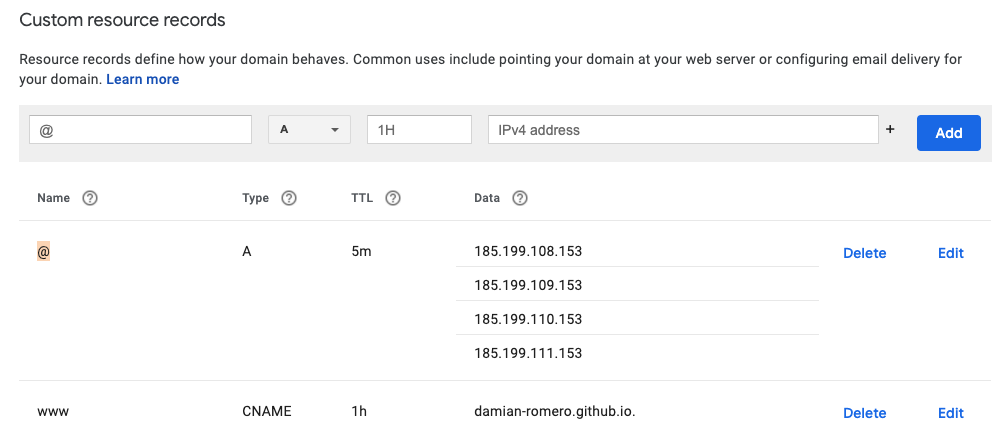
      <li>I followed the official <a href="https://docs.github.com/en/free-pro-team@latest/github/working-with-github-pages/managing-a-custom-domain-for-your-github-pages-site">GitHub documentation</a> and created an “A” record with the following IP addresses:
        <ul>
          <li>185.199.108.153</li>
          <li>185.199.109.153</li>
          <li>185.199.110.153</li>
          <li>185.199.111.153</li>
        </ul>
      </li>
      <li>I created an additional record as such:
        <ul>
          <li>www   CNAME   1h   damian-romero.github.io</li>
        </ul>
      </li>
    </ul>
  </li>
</ol>

<p>The result looks like this:</p>

<p><img src="/assets/images/custom-resource-records.png" alt="records" /></p>

<h1 id="ix-that-is-it">IX That is it!</h1>

<p>You’ve made it. Now you’re the proud owner of your personal website.</p>

<h2 id="resources">Resources</h2>

<ul>
  <li><a href="https://github.com/">GitHub</a></li>
  <li><a href="https://git-scm.com/">Git</a>
    <ul>
      <li><a href="https://github.com/damian-romero/gitflow_toy/blob/develop/resources/useful_links.md">Some git and GitHub resources</a></li>
    </ul>
  </li>
  <li><a href="https://jekyllrb.com/">Jekyll</a>
    <ul>
      <li><a href="https://docs.github.com/en/free-pro-team@latest/github/working-with-github-pages/setting-up-a-github-pages-site-with-jekyll">Learn more about GitHub pages and Git</a></li>
    </ul>
  </li>
  <li><a href="https://mmistakes.github.io/minimal-mistakes/">Minimal Mistakes</a>
    <ul>
      <li><a href="https://github.com/mmistakes/mm-github-pages-starter">Minimal Mistakes Theme Starter repo</a></li>
    </ul>
  </li>
  <li><a href="https://youtu.be/nN6QuNqmAwk?t=234">Custom domain YouTube tutorial</a></li>
  <li><a href="https://docs.github.com/en/free-pro-team@latest/github/working-with-github-pages/managing-a-custom-domain-for-your-github-pages-site">Custom GitHub domain configuration documentation</a></li>
  <li><a href="https://docs.github.com/en/free-pro-team@latest/github/working-with-github-pages/configuring-a-custom-domain-for-your-github-pages-site">Configuring a custom domain for your GitHub Pages site</a></li>
  <li><a href="https://www.markdownguide.org/basic-syntax/">Learn markdown</a></li>
</ul>

<p>You can check out my website repository <a href="https://github.com/damian-romero/damian-romero.github.io">here</a></p>

<hr />

<p>Jump higher!</p>

<p>- Damian</p>

<!-- Visitor counter -->
<!-- <p>
  <img alt="Visitors" src="https://visitor-badge.glitch.me/badge?page_id=damian-romero/damian-romero.github.io/blob/master/_posts/2020-12-26-how-i-built-this-website.md" />
</p> -->]]></content><author><name>Damian Romero</name></author><category term="blog" /><category term="Jekyll" /><category term="update" /><category term="website" /><category term="meta" /><summary type="html"><![CDATA[This is a very quick walkthrough of how I built this website in an afternoon using the Minimal Mistakes template for Jekyll. Read this article to learn more!]]></summary></entry><entry><title type="html">Welcome to my new website!</title><link href="https://damian-romero.github.io//blog/welcome/" rel="alternate" type="text/html" title="Welcome to my new website!" /><published>2020-12-03T22:00:00+00:00</published><updated>2020-12-03T22:00:00+00:00</updated><id>https://damian-romero.github.io//blog/welcome</id><content type="html" xml:base="https://damian-romero.github.io//blog/welcome/"><![CDATA[<p>Hi, Damian here. Welcome to my website! Please feel free to navigate around and do contact me if you have any questions or collaboration ideas.</p>

<p>I confess that, for building this website, I was trying to use (and even forked) the <a href="https://github.com/academicpages/academicpages.github.io">Academic Pages</a> template, which is based on <a href="https://github.com/mmistakes/minimal-mistakes"><code class="language-plaintext highlighter-rouge">Minimal Mistakes</code></a>. Still, I was seduced by the original, plus I believe that Academic Pages is not being maintained at the moment of writing.</p>

<p>For a full (but concise) walkthrough about how I built my website using Jekyll, GitHub, and Minimal Mistakes on MacOs Catalina, please navigate to the following link: <a href="[link](https://d-romero.com/blog/how-i-built-this-website/)">‘How I built this website’</a></p>

<p>And remember to…</p>

<p>Jump higher!</p>

<p>- Damian</p>

<p align="center"><img src="https://data.library.arizona.edu/sites/default/files/styles/uaqs_medium/public/images/people/IMG_1131-edited.jpg?itok=7LftX1hx" /></p>

<!-- <p>
  <img alt="Visitors" src="https://visitor-badge.glitch.me/badge?page_id=damian-romero/damian-romero.github.io/blob/master/_posts/2020-12-03-welcome.md" />
</p> -->]]></content><author><name>Damian Romero</name></author><category term="blog" /><category term="Jekyll" /><category term="update" /><category term="website" /><category term="meta" /><summary type="html"><![CDATA[Hi, Damian here. Welcome to my website! Please feel free to navigate around and do contact me if you have any questions or collaboration ideas.]]></summary></entry></feed>